Table of contents
- Quick Answer: What You Should Budget
- The Pricing Drivers That Actually Move The Number
- Hourly Rates Vs Per-Asset Pricing: What App Brands Should Prefer
- What You’re Buying: Usage, Platform Fit, And Performance Learning
- How To Hire Without Wasting Time (Or Burning Goodwill)
- A Buyer’s Checklist For Your Next Batch
- FAQ
Quick Answer: What You Should Budget
If you’re an app brand trying to move fast, the cleanest way to think about pricing is this: you are not paying for a “nice clip”, you are paying for repeatable testing material that helps you learn, iterate, and scale. In our world, that means budgets need to cover creator time, production quality, and the practical realities of usage.
Here’s the short version I give founders in our Shoreditch meetings:
- Start with a small batch of videos, learn what converts, then expand.
- Pay fairly for clarity and speed, not for hype.
- Lock down usage properly so you can reuse winners without arguments.
I’ll break down what ugc typically costs for apps, why ugc rates change so much, what “good value” looks like, and how to hire creators without falling into the usual traps.
If you remember one thing: your best results come when you treat ugc as a system, not a one-off spend.
The Pricing Drivers That Actually Move The Number
The reason UGC pricing is so inconsistent is that the “job” changes depending on what you need. A simple talking-head clip is one job. A scripted hook with product proof, on-screen text, and multiple cut-downs is another job entirely.
Here are the big drivers behind UGC rates:
1) Deliverable type and complexity
A bundle of short videos usually costs less per asset than one “perfect” hero video. But complex edits, voiceover, b-roll, and heavy on-screen text raise the work involved.
2) Speed and responsiveness
Rush turnarounds cost more. Not because creators are being difficult, but because you’re asking them to reshuffle their jobs queue.
3) Proof and claims
Apps often require specific proof: screen recordings, feature walk-throughs, or results. That adds steps, revisions, and sometimes reshoots.
4) Usage scope
Usage is where brands get caught out. If you want to run paid ads, whitelist, or reuse content for months, that needs to be priced properly.
5) Fit for the platform
A creator who genuinely understands the platform (format, pacing, hook structure) saves you money because you need fewer revisions and fewer “misses”.
This is why rates vary. The creator is not just filming; they are doing multiple jobs at once: scripting, shooting, editing, and versioning.
UGC Creator Rates In The Real World (With Ranges)
Let’s talk about UGC creator rates without pretending there’s a single universal number.
For app brands, I typically see three realistic bands:
Starter band (testing batch)
You’re buying a small batch of UGC videos to test hooks and angles. This is best when you’re still learning what message lands. The value is speed and iteration.
Mid band (structured performance batch)
You want a repeatable system: consistent briefs, consistent turnaround, and better conversion intent. This is often where the best pricing-to-performance ratio sits.
Premium band (high polish + high reliability)
You’re paying for higher production, faster revisions, stronger scripting, and a more confident performance style. Worth it when you have a proven angle and you’re scaling.
In practice, average UGC spending per month depends on how many jobs you’re running and how aggressive your paid testing calendar is. A sensible starting point is to treat the first batch as learning: a controlled budget, clear tracking, and an honest review.
To keep this buyer’s guide practical, here’s the question I ask: “How many experiments do you need to run this month to find one or two winners?” That tells you how many videos you need, and pricing becomes a maths problem rather than a guess.
Hourly Rates Vs Per-Asset Pricing: What App Brands Should Prefer
Some teams ask about hourly rates, but for most UGC work, hourly billing tends to create friction. It makes the creator defend their time, and it makes the brand feel like they’re paying for every small tweak.
For apps, I recommend per-asset pricing with clear inclusions:
- How many videos
- How many variations
- How many revisions
- What counts as “done”
That gives you a cleaner process, fewer disputes, and easier comparison between creators.
There is one exception: when you’re doing ongoing creative production support, where the creator is effectively embedded. In that case, hourly billing can work, but you need a structured scope so the work does not drift.
What You’re Buying: Usage, Platform Fit, And Performance Learning
This is where many brands lose money. They negotiate the video price, then forget the usage rules, then realise they cannot run the ad properly.
You should decide up front:
- Where the content will live (organic, paid, website, store listing, email)
- How long you want to use it
- Whether you need whitelisting or Spark-style authorisation
- Whether you need cut-downs for each platform
When UGC is part of a paid acquisition plan, usage needs to be explicit. Otherwise you end up with a winning UGC video you cannot scale without renegotiation.
Here’s the line I use internally: “Buy usage like you buy insurance.” You hope you won’t need to lean on it, but when something works, you want the right to move quickly.
This is also where you should ask for UGC content deliverables in a way you can actually reuse: clean exports, captions, and versions without baked-in platform UI unless requested.
Creators UGC work best when you treat it like a performance pipeline: brief, produce, test, learn, improve.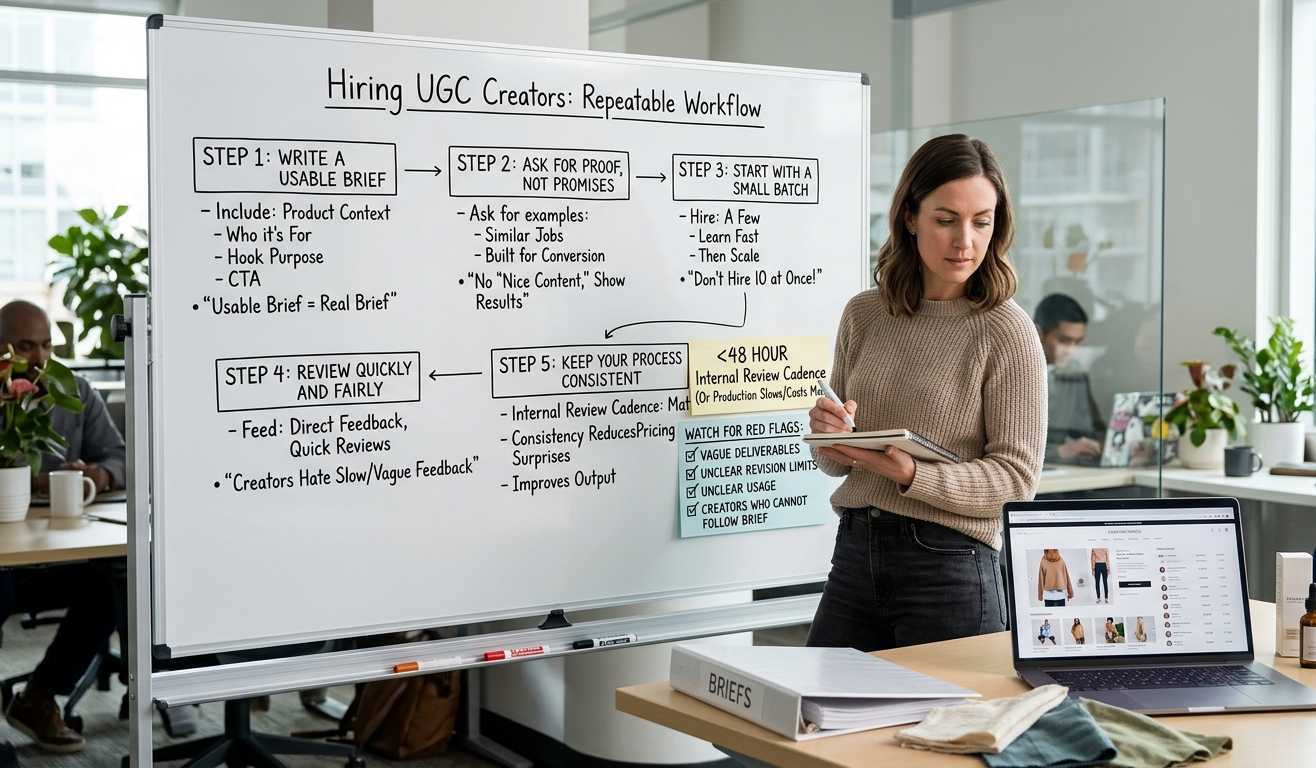
How To Hire Without Wasting Time (Or Burning Goodwill)
Hiring UGC creators is easier when you treat it as a repeatable workflow.
Here’s the approach I recommend for brands:
Step 1: Write a brief that’s actually usable
Include product context, who it’s for, what the hook needs to do, and what you want the viewer to do next.
Step 2: Ask for proof, not promises
Ask for examples that show similar jobs. Not just “nice content”, but content that’s clearly built for conversion.
Step 3: Start with a small batch
Do not hire ten creators at once if you’ve never tested your message. Hire a few, learn fast, then scale.
Step 4: Review quickly and fairly
Creators can handle direct feedback. What they hate is slow, vague feedback.
Step 5: Keep your process consistent
Consistency reduces your pricing surprises and improves output.
This is where your internal review cadence matters. If your team cannot review within 48 hours, you will slow production, and the work will cost more in the long run.
And yes, you should still watch for red flags: vague deliverables, unclear revision limits, unclear usage, or creators who cannot follow a brief.
A Buyer’s Checklist For Your Next Batch
Below is a short checklist you can paste into your campaign notes. It keeps the process calm and avoids pricing confusion.
- Confirm the number of videos and formats
- Confirm the revision limit and turnaround
- Confirm what “platform-ready” means
- Confirm paid usage duration and placement
- Confirm whether you need raw files
- Confirm who owns performance reporting
- Confirm how feedback will be shared
- Confirm the payment trigger for delivery
One last practical point: if you want to protect the relationship, do not squeeze pricing down to the last penny. A creator who feels respected will give you better work, faster.
This is a business relationship, not a one-off gig.
FAQ
How much should an UGC creator charge?
It depends on scope, speed, and usage. For apps, the fairest approach is per-asset pricing with a clear brief and defined revisions, so everyone knows what “done” looks like.
How much does UGC cost?
UGC cost is driven by complexity, number of videos, edit requirements, and paid usage. The fastest way to control pricing is to start with a small batch and increase volume once you’ve found a winning angle.
What apps do UGC creators use?
Most creators use a mix of filming, editing, captioning, and asset management tools. From a brand perspective, what matters is whether they can deliver clean exports in the right formats for each platform.
How much do UGC creators charge for photos?
Photo pricing is usually lower than video, but usage still matters. If you plan to run the images in paid campaigns, price and permissions should reflect that.
Closing notes
If you want better UGC results, do not obsess over the cheapest rate. Obsess over the cleanest system: clear briefs, quick reviews, sensible usage, and consistent jobs for creators who deliver.
That is how app brands get predictable performance without chaos.